

DORA’s 2024 research surveyed over 39,000 professionals worldwide and confirmed what most teams already feel: software delivery performance hinges on the gap between commit and deployable artifact. When QA engineers in three time zones need to reproduce a flaky test on a Windows build agent, or a release engineer must SSH into a Mac runner to inspect a code-signing failure, the speed of that handoff defines your lead time. Remote desktop access stops being a help-desk tool and becomes pipeline infrastructure. This guide shows where it fits, how to integrate it cleanly, and how to keep DevSecOps happy while you do.
Key Takeaways
- Remote desktop access fills the gaps headless CI runners cannot cover: GUI tests, code signing, and physical-device validation.
- Standardize build agents and test environments before wiring in any access tooling.
- Use DORA metrics to measure performance impacts; ignore vendor demos.
Why CI/CD Teams Still Need Remote Desktop Access
Modern CI/CD pipelines automate most build and test steps through orchestrators like Jenkins, GitHub Actions, and GitLab, but some work simply cannot run headlessly. A pixel-perfect Windows installer test needs an interactive desktop session. A failed Mac notarization step needs a human to inspect Keychain. A legacy hardware-in-the-loop suite needs a technician next to the rack, or, more often, a remote one with screen control.
This is where remote desktop tools for DevOps teams earn their place in the toolchain. They give distributed testers and platform engineers fast, secure, audited access to the exact machine that ran a job, without spinning up costly self-hosted runners on every laptop. The broader CI/CD discipline assumes this kind of access is solved; in practice, most teams still patch it together with VPNs and screen-share calls. SoftwareTestingMagazine has a thoughtful primer on how testing teams keep pace with fast CI/CD cycles, and remote access slots cleanly into that picture.

Where Remote Desktop Fits Across the Pipeline
Not every stage benefits equally. Use this map to spot the high-value insertion points:
| Pipeline Stage | Remote Desktop Use Case | Value to QA / DevOps |
| Pre-commit | Run pre-merge smoke tests on a clean Windows or Mac VM | Catches OS-specific regressions before merge |
| Build | Inspect failed code-signing or notarization on Apple runners | Cuts mean time to recovery for release jobs |
| Automated test | Debug flaky GUI tests on interactive desktop sessions | Reduces ticket ping-pong between QA and dev |
| Manual exploratory | Distributed QA accesses pre-configured test rigs | Removes hardware shipping; speeds onboarding |
| Deployment | Step into a staging server to verify a release smoke check | Faster sign-off without VPN bottlenecks |
| Post-release | Reproduce a customer-reported bug on a matching device profile | Lower change failure rate over time |
The pipeline does the boring, repeatable work; remote access handles the cases that need a human eye.
Integrating Remote Desktop With the Pipeline
Three steps cover most setups. Treat them as a checklist, not a one-week project.
1. Standardize Your Test Environments
Before granting any remote access, lock down what your engineers will see when they connect. Image your Windows, macOS, and Linux build agents from a single source of truth (Packer, Bake, or a golden VM template). Every machine should have the same SDK versions, the same browser binaries, and the same test data set. Inconsistent environments are the single biggest source of “works on my machine” tickets in distributed QA. SoftwareTestingMagazine’s guide to anonymized test data delivery in pipelines is worth a read alongside this.
2. Map Access by Role, Not by Person
Define groups before granting any individual permissions. For example:
- QA engineers: access is limited to only test rigs.
- DevOps engineers: access is to build agents and staging, granted in an unattended manner.
- Release engineers: access to production with session recording is granted.
- External contractors: access is limited to the duration of the contract.
This is how mature teams consider access and control of their trackers, such as Jira, or their cloud computing resources, such as AWS.
3. Wiring Into Orchestrator
The APIs of modern remote desktop systems can be directly invoked from your pipeline. Two useful patterns are:
- On-Demand Session Creation: Triggers a webhook on a failing CI job that creates a remote session on the runner that expires shortly, and sends a one-click link notification via Slack to the oncall engineer.
- Persistent test rigs: a pool of pre-configured machines stays online for exploratory QA, accessed through SSO with audit logs streaming to your SIEM.
Both patterns shrink the human bottleneck without weakening security. Software testing in agile and DevOps environments already pushes toward this kind of fast, structured collaboration; remote desktop just makes it visible at the machine level.
Security Considerations for DevSecOps Teams
Every new access path is a new attack surface. An overview of layered defenses for the CI/CD pipeline applies word for word to remote desktop integrations: restrict who reaches what, encrypt every session, monitor everything, and rotate credentials on a schedule.
| Five non-negotiables for remote desktop in a pipeline
Multi-factor authentication on every account, granular role permissions, end-to-end encrypted sessions, full session recording for audit, and idle timeouts that force reauthentication. Skip any one of these and you weaken the rest. |
Measuring the Impact on DORA Metrics
The four DORA metrics give you a clean way to prove the integration is working: deployment frequency, lead time for changes, change failure rate, and time to restore service. The 2024 report cluster distribution is shown below.
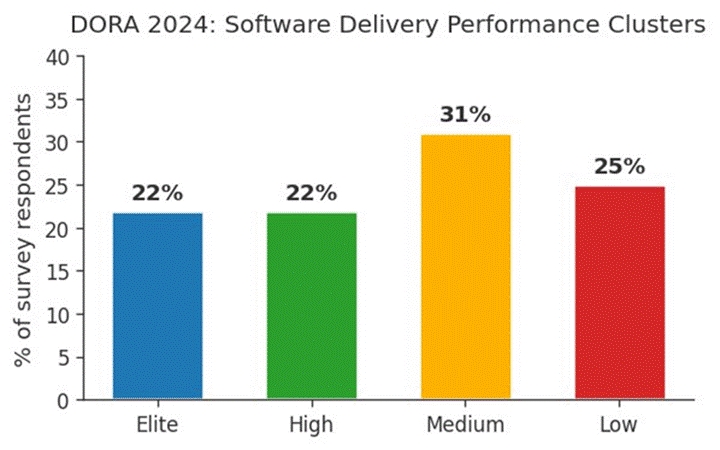
Teams that wire remote access into their pipeline typically see two of the four metrics move first: mean recovery time drops because engineers reach the broken machine in minutes, and change failure rate falls because exploratory QA finds issues that headless suites miss. Lead time and deployment frequency follow once the workflow stabilizes.
Frequently Asked Questions
Does adding a remote desktop slow down a CI/CD pipeline?
No. The pipeline still runs headlessly by default. Remote sessions only spin up on demand when an engineer needs to inspect a job or environment, so steady-state performance does not change.
Can a remote desktop replace self-hosted CI runners?
Not directly. Self-hosted runners execute jobs; remote desktop provides human access to those runners. They are complementary. Most mature pipelines use both: runners for automation, remote sessions for human troubleshooting.
How does remote desktop access fit with shift-left testing?
Shift-left moves testing earlier in the pipeline. Remote desktop supports that by letting QA engineers reach pre-production test rigs the moment a feature branch is built, instead of waiting for a deployment window or filing a ticket with infrastructure.
What is the simplest way to start?
Pick one painful workflow, like debugging Mac code-signing failures, and pilot remote access for that team only. Measure the impact on incident recovery for 30 days, then expand to the next workflow.
Closing Thought
CI/CD automation handles the predictable work; humans still need to step in for the messy edge cases. A well-integrated remote desktop layer respects both realities. It keeps pipelines fast and headless by default while giving QA and DevOps engineers a clean, audited path into the machine when they need one. Standardize the environments, scope access by role, wire the sessions into your orchestrator, and let DORA metrics tell you whether it is working.
References
DORA, 2024 State of DevOps Research Report: https://dora.dev/research/2024/
Fortinet, CI/CD Pipeline Security Cyberglossary: https://www.fortinet.com/resources/cyberglossary/ci-cd-pipeline
Wikipedia, CI/CD: https://en.wikipedia.org/wiki/CI/CD
SoftwareTestingMagazine, Speed Up Software Testing and Fit in CI/CD: https://www.softwaretestingmagazine.com/knowledge/speed-up-software-testing-and-fit-in-ci-cd/
Fact Check: All statistics and references in this article were verified against original sources as of May 2026.