
Every software release carries risk, but that risk is not spread evenly. In most codebases a relatively small share of changes accounts for a large share of the defects that reach customers, yet most teams test every change in roughly the same way. Effort is spread thin, test suites grow slower, and the change that needed attention still slips through.
Author: Faisal Qureshi, Hourglass Software, https://hourglass-software.com/
Hourglass Quality Manager takes a different approach. It learns from each team’s own history: it reads commits from the team’s Git provider, links them to Jira issues, and traces every bug fix back to the change that introduced the bug. From that history it scores each new commit for risk and, with a machine learning model trained on the team’s own data, estimates the probability that the commit introduces a defect.
Those predictions then drive action. Risky changes automatically trigger the right test jobs in the team’s existing CI system. Where coverage is thin, Amazon Bedrock drafts new tests in the repository’s own language and framework. A quality dashboard shows whether defect rates, test results and release risk are improving over time.
Hourglass runs entirely inside the customer’s own AWS account and is available through AWS Marketplace. Source code, issue data and models never leave that account, which keeps security reviews simple and puts the subscription on the customer’s existing AWS bill.
This paper describes the problem, the approach, how the product works, its architecture and security model, how teams adopt it, and its limitations.
The problem: equal effort, unequal risk
Modern teams merge changes many times a day. Each change passes through the same pipeline: the same test suites, the same review checklist, the same release gate. That consistency is valuable, but it hides an important fact. Changes are not equally risky.
A one-line copy fix and a refactor of payment retry logic both go through the same steps. Yet the refactor touches more files, crosses service boundaries, changes code that has needed repeated fixes before, and may be written by someone new to that part of the system. Experienced engineers sense this intuitively, but intuition does not scale across dozens of engineers and hundreds of changes a week, and it is rarely written down.
The result is a familiar pattern:
- Test suites keep growing. Teams add tests after every incident, so full runs get slower and are run less often, or only partly.
- Effort is spread thin. Reviewers and testers give similar attention to every change, so the risky ones get less than they need.
- Defects escape anyway. The changes most likely to break production are not identified until something breaks.
- Quality is hard to see. Teams know how many bugs were reported, but not which kinds of change cause them or whether things are getting better.
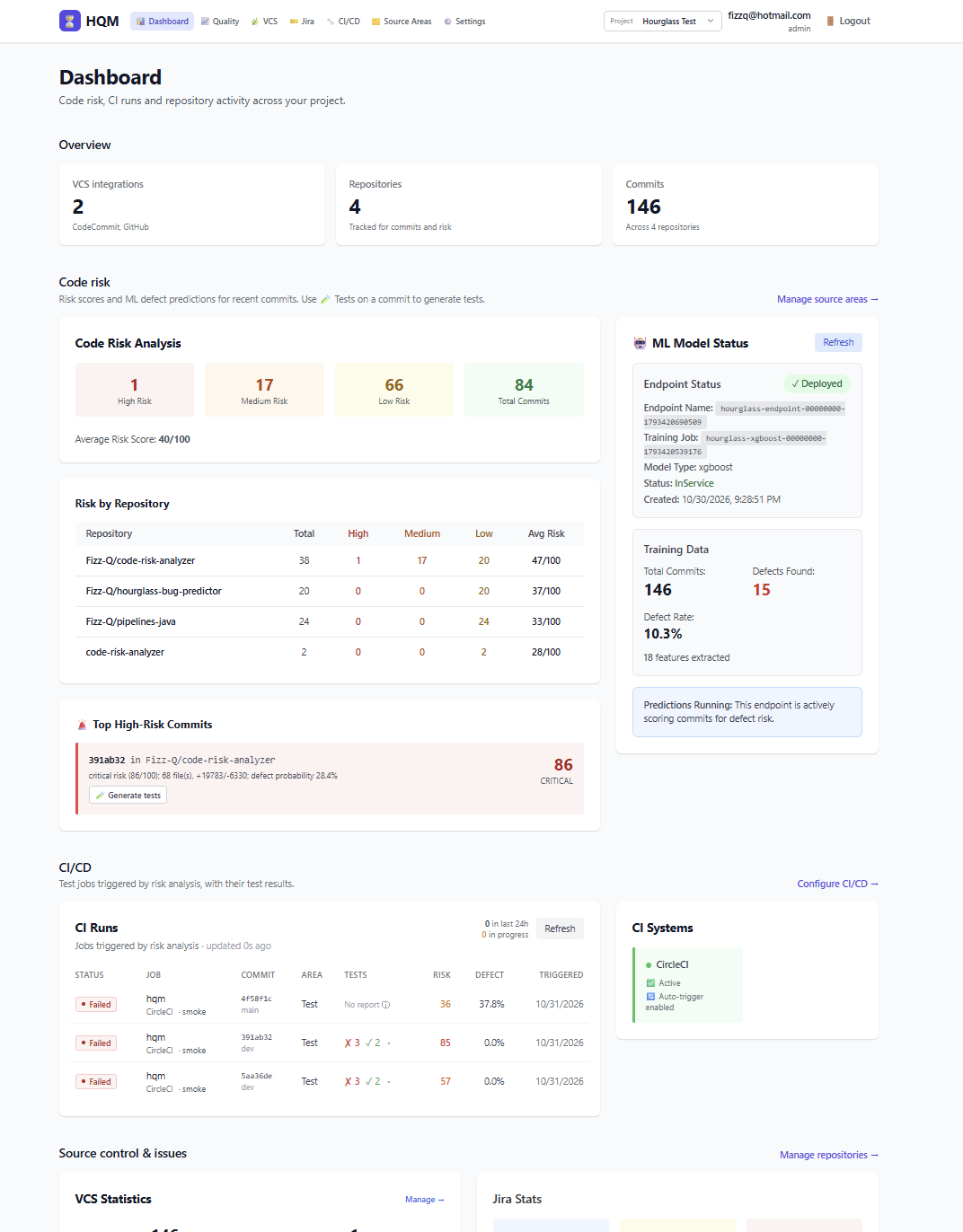
Existing tools each solve part of this. Static analysis and code quality tools judge the code itself. Test intelligence tools learn from past test results to run fewer tests. Engineering metrics platforms measure delivery speed. AI coding assistants can write tests on request. What is usually missing is a single view that connects the defects a team has actually shipped to the changes that caused them, and then uses that knowledge to decide where testing should go next.
(click on image to enlarge)
A different approach: learn from your own defects
Every team already holds the answer to “which changes are risky?” in its own history. Each bug in Jira was eventually fixed by a commit, and that fix points back to the lines of code that were wrong. Those lines were written by an earlier commit: the change that introduced the bug. Researchers formalized this idea as the Śliwerski, Zimmermann, and Zeller (SZZ) approach, which traces bug fixes back through version history to the commits that introduced them.
Once a team knows which past commits introduced bugs, it can ask what those commits had in common. Were they larger than usual? Did they touch files with a long history of fixes? Were they spread across many parts of the system? Were they written by someone new to that code? The patterns differ from team to team and codebase to codebase. That is why a generic rule set is not enough, and why a model trained on the team’s own history is valuable.
Hourglass Quality Manager builds on this idea with three principles:
- Prediction should come from your own data. Risk is scored using the team’s own commits and bugs, not an industry average.
- Prediction is only useful if it changes what happens next. Scores drive which tests run, where new tests are written, and what reviewers look at.
- Your code should stay where it is. Everything runs inside the customer’s AWS account, so no source code or issue data is sent to a third party.
How Hourglass Quality Manager works
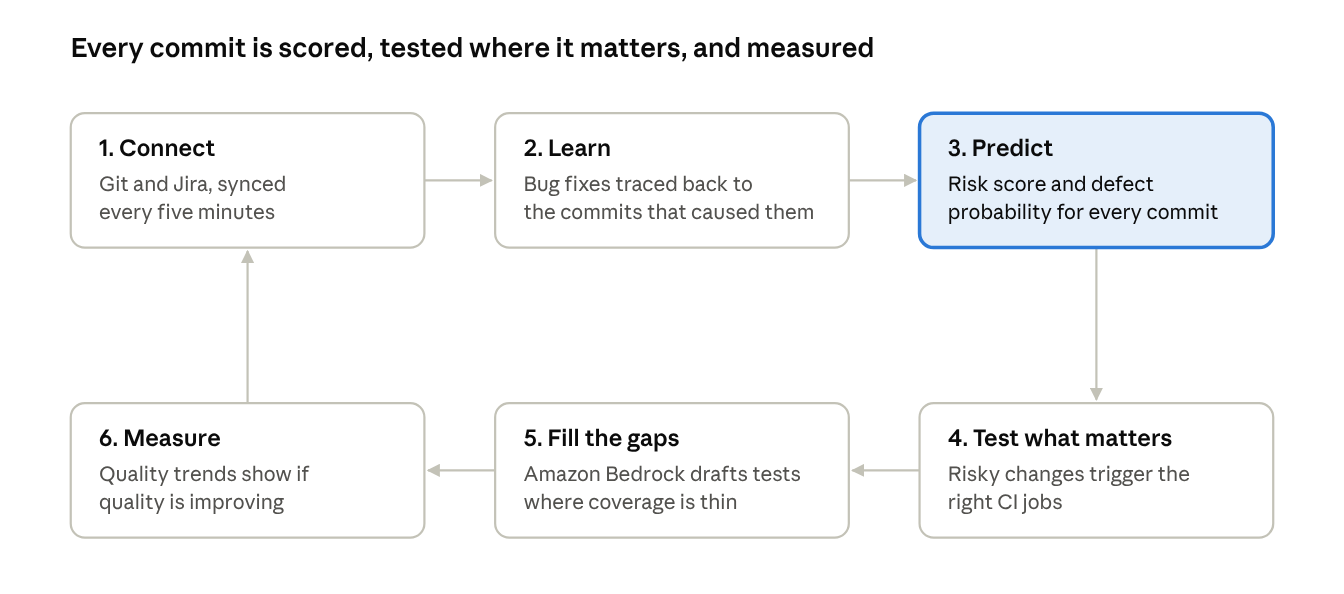
Hourglass works as a continuous loop. Every new commit is connected to the team’s history, scored, tested where it matters, and fed back into the measurements that show whether quality is improving.
The Hourglass loop · 6 stages (click on image to enlarge)
The loop repeats for every commit, and each pass adds to the history the next prediction learns from.
1. Connect
Hourglass connects to the team’s source control (GitHub, GitLab, Bitbucket Cloud or AWS CodeCommit) and to Jira. Teams choose which repositories and branches to track. Commits sync every five minutes, and the existing history is analysed in the background, so risk scores appear within about half an hour of connecting. Connections use read-only tokens, or the installation’s own AWS role for CodeCommit.
2. Learn
Hourglass links commits to Jira issues through the issue keys in commit messages and branch names. For each bug-fix commit, it traces the changed lines back through history to the commit that introduced them. Over time this builds a map of where defects really come from: which files, which kinds of change, and which conditions.
3. Predict
Every commit receives two measures:
- A risk score from 0 to 100, calculated from factors such as the size and spread of the change, how often the files it touches have needed bug fixes, and the author’s familiarity with that code.
- A defect probability from a machine learning model (XGBoost, trained with Amazon SageMaker) built from the team’s own bug-introducing and clean commits. Training runs from the settings page in about 15 minutes, and the current model keeps serving until a new one is ready.
The dashboard ranks recent commits by risk and explains each score, so reviewers can see why a change was flagged rather than trusting a number they can’t question.
4. Test what matters
Teams describe their codebase as source areas, such as payments or authentication, defined by file patterns per repository. Job mappings then connect each area to a test job in the team’s CI system: Jenkins, GitHub Actions, GitLab CI, CircleCI, TeamCity, Azure Pipelines or AWS CodePipeline. A mapping fires when a commit changes files in its area, matches a branch rule, and crosses a risk score or defect probability threshold. Hourglass sends the commit, its risk score and its defect probability to the CI job, and pulls the test results back for each run. Teams can also start any mapping on demand for a branch or a specific commit.
5. Fill the gaps
For any commit, Hourglass can generate tests with Amazon Bedrock. It reads the change and the surrounding code, detects the repository’s language and test framework (for example Jest, pytest, JUnit, Go test or RSpec), and uses existing tests as style examples. The prompt includes the commit’s risk factors, so the generated tests focus on what makes the change risky. Tests that duplicate existing ones are removed, and generated tests are tracked so teams can see when they catch real defects in CI.
6. Measure
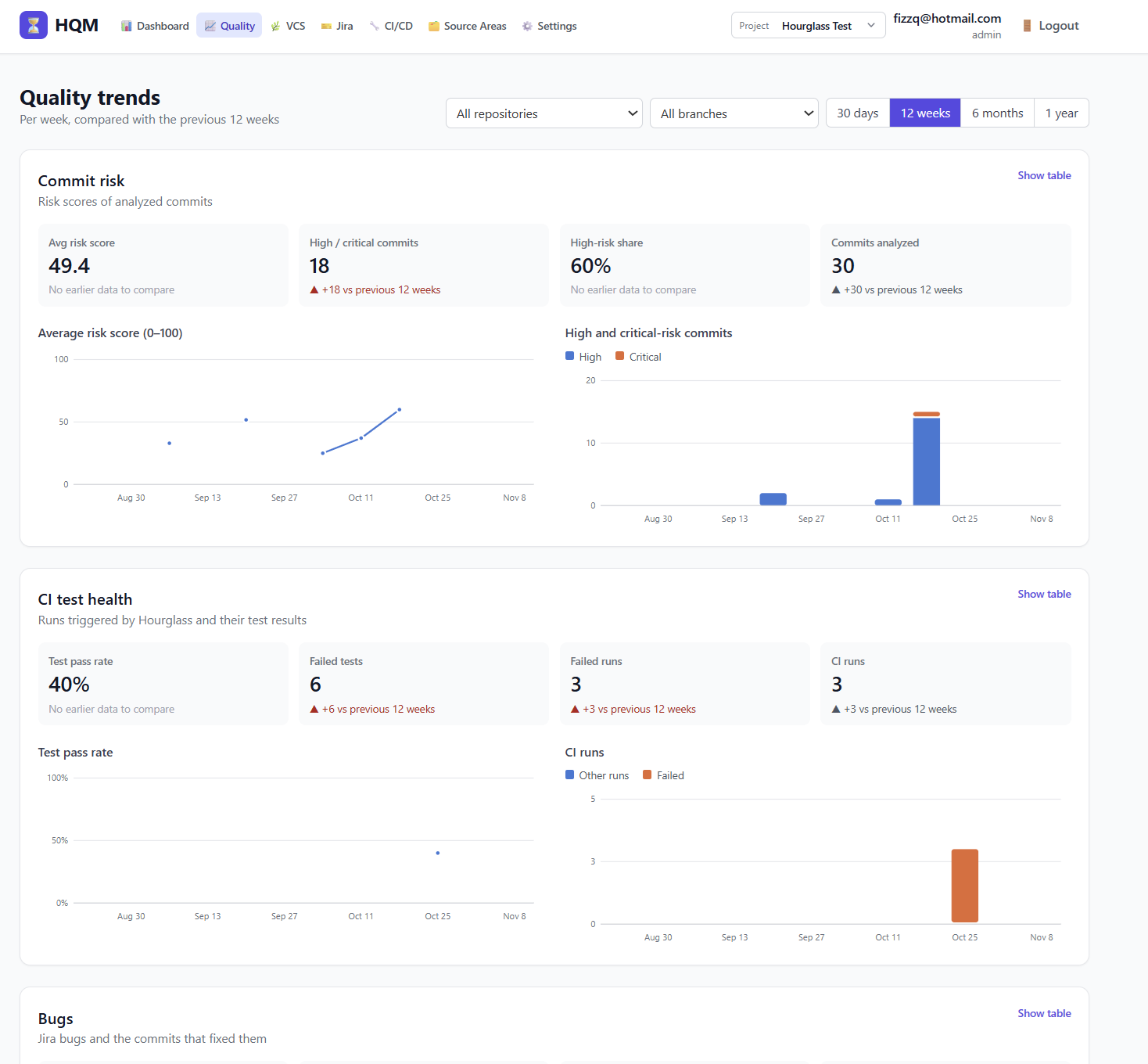
The Quality page shows trends over time: average commit risk, high-risk commits, CI pass rates and failed runs, bugs reported and resolved, and commit activity, filtered by repository and branch. When a new model is trained, recent commits are re-scored with it, so the trends and CI thresholds always use current predictions.
(click on image to enlarge)
Architecture and security
Most quality and analytics tools are delivered as SaaS: the vendor’s servers read the customer’s repositories and store the results. For many organisations, that means a long security review before anyone can try the product. Hourglass is built the other way round. It is deployed into the customer’s own AWS account from AWS Marketplace, through an AWS CloudFormation template, and nothing leaves that account.
A standard deployment contains:
- One Amazon EC2 server running the application behind HTTPS, in the customer’s VPC. A security group allows access only from an IP range the customer chooses. There is no SSH access; administrators use AWS Systems Manager Session Manager.
- A database: Amazon RDS for PostgreSQL, with an optional Multi-AZ standby, or a lower-cost local PostgreSQL database on its own encrypted EBS volume with daily snapshots. Both are kept when the server is upgraded or replaced.
- Amazon S3 for training data and models, AWS Secrets Manager for generated database passwords and encryption keys, and Amazon CloudWatch Logs for application logs.
- Amazon SageMaker for training and serving the defect model, and Amazon Bedrock for test generation, both called from within the account.
- AWS License Manager, which confirms the AWS Marketplace subscription.
Security follows a few firm rules:
- No access keys. The server and SageMaker each use a least-privilege IAM role created by the stack, limited to the stack’s own bucket, secrets and model resources.
- Encrypted everywhere. Disks, the database, the S3 bucket and integration tokens are encrypted; tokens stored in the database are encrypted with a key held in Secrets Manager.
- Isolated installations. Every installation tags its models with its own identity, so two installations in one AWS account, such as production and staging, never touch each other’s models.
- Controlled network access. The server reaches Git, Jira and CI providers over HTTPS. Inbound access is limited to the customer’s chosen IP range, apart from certificate validation when a custom domain is used.
Because everything is billed through AWS, the subscription appears on the customer’s AWS invoice alongside the infrastructure it runs on.
Adopting Hourglass
Hourglass is designed to show value quickly and to improve as history builds up.
Day one: deploy and connect. A team subscribes in AWS Marketplace, launches the CloudFormation stack (about 5 minutes with the local database, 15 with Amazon RDS), creates the first administrator account and connects its repositories and Jira. Two preparation steps avoid surprises: request the Amazon SageMaker instance quotas for training and the prediction endpoint, since new AWS accounts often start at zero, and confirm that the Bedrock model used for test generation is available in the region.
The first week: risk scores and targeted tests. Recent history is scored in the background, so the dashboard shows risk scores within about half an hour. Teams define a few source areas for their most sensitive code and map them to existing CI jobs, so high-risk changes in those areas start triggering tests straight away. Test generation is available from the first day.
When history allows: the first model. Training needs at least 10 bug-introducing commits and 10 clean commits with known changes. Teams that already mention Jira issue keys in their commits often reach this quickly; others reach it as new fixes arrive.
Ongoing: retrain and review. Predictions improve as more history accumulates, so retraining monthly, or after a burst of bug fixes, keeps the model current. The Quality page then shows whether the share of high-risk commits, CI failures and reported bugs is moving in the right direction.
Upgrades are applied by updating the CloudFormation stack with a new version. The server is replaced, but data, settings and the trained model carry over.
Limitations and considerations
No prediction is perfect, and Hourglass is most useful when its limits are understood.
- Predictions depend on history.
The model learns from bugs that were recorded in Jira and linked to fixes. Teams that rarely log bugs, or never mention issue keys in commits, will see weaker predictions until that practice improves. Rule-based risk scores work from the start. - A risk score is guidance, not a verdict. A high score means a change deserves attention, not that it is wrong. A low score doesn’t remove the need for review.
- Some CI systems can’t build an exact commit through their API. CircleCI, GitHub Actions and GitLab CI start builds on a branch, so their pipeline configuration must check out the commit Hourglass sends. Jenkins, TeamCity, Azure Pipelines and AWS CodePipeline (V2) build the exact commit directly.
- Generated tests need review. Tests from Amazon Bedrock follow the repository’s conventions, but they should be reviewed like any other code before they are committed.
- AWS resources have their own cost. The EC2 server, database, the always-on SageMaker prediction endpoint, training runs and Bedrock requests are billed by AWS to the customer’s account, separately from the subscription.
- It complements other tools. Hourglass doesn’t replace code review, static analysis or a team’s existing test suites. It decides where that effort should go.
Conclusion
Software quality improves fastest when effort goes where risk is highest. Most teams already have the information needed to find that risk, scattered across their Git history, their Jira projects and their CI results. Hourglass Quality Manager brings it together: it learns which changes have caused defects before, predicts which new changes are likely to do the same, runs the right tests automatically, writes the tests that are missing, and shows whether quality is improving over time. And it does all of this inside the customer’s own AWS account.
The result is a quality process that scales with the team: fewer defects reaching customers, faster pipelines that spend time on the changes that matter, and a clear picture of quality from one release to the next.
Get started
Hourglass Quality Manager is available on AWS Marketplace with Team, Business and Enterprise plans:
https://aws.amazon.com/marketplace/pp/prodview-p5oqbacthbcg4
https://www.hourglass-software.com/HourglassQualityManager.html
To arrange a demo or an evaluation through a private offer, contact Hourglass Software at faisal [at] hourglass-software.com.
Leave a Reply