
Confluence can store QA docs, but it seldom helps testers find the right one when release pressure hits. The problem is rarely the editor. It is that test plans, environment runbooks, and release checklists drift out of date faster than anyone updates them, and a wiki that merely holds pages cannot tell you which ones still reflect reality.
If you are looking for a Confluence alternative for software testing, this comparison grades six contenders on three weighted factors — QA tool-chain fit, AI-assisted freshness under human control, and real cost for a 20-editor team.
How We Evaluated Confluence Alternatives for QA Teams
We compared 20 documentation and test-management products against ten weighted criteria. Three carried the most weight:
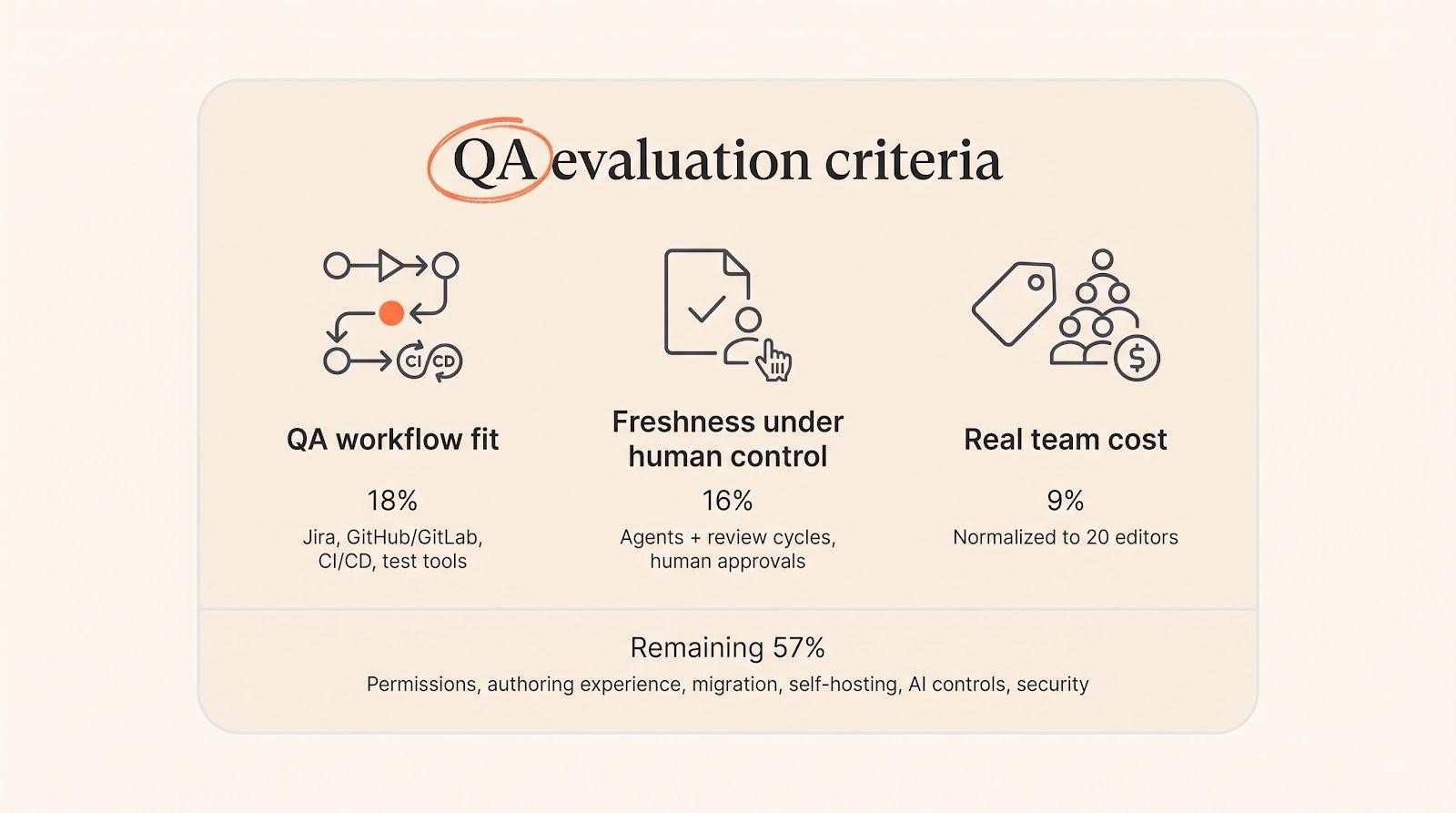
- QA workflow fit (18 percent) — the tool must connect directly to Jira, GitHub, GitLab, CI/CD pipelines, and common test-automation tools.
- Freshness under human control (16 percent) — we scored agents and review cycles that detect drift, propose fixes, and wait for approval higher than raw text generation.
- Real team cost (9 percent) — all prices normalised to a 20-editor team, seats only.
The remaining 57 percent covers permissions depth, authoring experience, migration tooling, AI controls, and security.
For a broader market map first, see this guide to Confluence alternatives, then come back for the tester’s lens.
The Six Best Tools at a Glance
| Rank | Tool | Best for | Stand-out freshness feature | Approx. cost for 20 editors* |
| 1 | Slite | Keeping QA knowledge current | Self-maintaining Slite Agent (detect → propose → approve) | $400 / month (annual billing) |
| 2 | Outline | Budget-friendly team wiki | Built-in MCP with AI answer bot | $79 / month (cloud, 11–100 users) |
| 3 | Notion | Flexible docs and lightweight trackers | Page verification, Custom Agents | $200 / month (annual billing) |
| 4 | GitBook | Automation and API documentation | GitBook Agent; Git-sync change reviews | $305 / month (annual billing) |
| 5 | Document360 | Governed, review-heavy docs | Knowledge Pulse duplicate detector | Custom quote |
| 6 | TestRail | Formal test artifacts and traceability | AI-generated test cases and prioritization | $700 / month (annual billing) |
*USD, seats only, prices checked August 2026.
1. Slite — Best Overall for Keeping QA Documentation Current
Why Slite Tops the List
Slite positions itself as the self-maintaining knowledge base — a knowledge base AI agents can pull from, kept current by an agent that spots drift between the docs and the tools where the work actually happens. That agent works in three moves:
- Detect. It compares every Slite page with activity in Slack, Linear, GitHub, Intercom, and more than twenty other tools, flagging drift as it appears.
- Act. It updates existing docs from natural-language intent. Through the Slite MCP it can also write new docs, merge duplicates, restructure sections, rename, and archive. Proposed changes route to a Triage queue with a diff preserved for audit.
- Control. Nothing goes live until a human accepts it.
QA teams feel this immediately: a Terraform variable changes and the environment runbook updates the same morning; a rollback step lands in Linear and the release checklist follows before the next stand-up.
Day-to-Day in Triage
Each Triage card shows the external trigger — a merged pull request, say — and one-click options to accept, edit, snooze, or ignore, so testers clear stale docs in minutes rather than meetings. AI Ask fills the gaps by answering from cited pages or saying “no answer found”, which prompts owners to create the missing page rather than leaving a silent hole.
Pricing
- Pro — $20 per user per month billed annually, with full Slite Agent access, cross-tool search, agent workflows, 50 agent credits per seat per month, and HIPAA compliance.
- Basic — $10 per user per month billed annually, with verification cycles and Ask limited to Slite docs.
A 14-day trial needs no credit card. Every tier includes MCP, so external agents can read or propose edits without extra seats. Slite is SOC 2 Type II and GDPR compliant with an EU-hosted option and SSO/SCIM.
Watch-Outs
No on-premises deployment, no Microsoft Teams connector, no Dropbox integration, no OCR, and the Agent cannot be disabled.
When Slite Is the Right Pick
Choose Slite when test knowledge lives in chats, tickets, and code reviews that change faster than humans can copy and paste.
2. Outline — Best Budget-Friendly Team Wiki
For many QA teams the hurdle is cost predictability. Finance wants a flat rate and DevOps wants an editor people enjoy. Outline delivers both: a 20-editor team pays $79 per month on the 11–100 user tier, covering real-time collaboration, comments, version history, and an editor that handles tables and code blocks without fuss.
Collections keep knowledge tidy — environment runbooks in one, automation guides in another, post-mortems in a third. Paste a GitLab merge-request URL and Outline renders it as an embedded card, which suits testers reviewing code-related fixes. A built-in MCP server lets external agents search, draft, move, or update pages with every action logged.
Watch-Outs
Outline lacks native drift detection or verification cycles. Teams that need hands-off freshness should compare Slite’s Agent.
When Outline Makes Sense
Pick Outline when predictable cost outranks hands-free content maintenance and you still want AI-ready documentation.
3. Notion — Best for Flexible QA Databases and Documentation
One adaptable workspace can beat running two separate tools. In Notion a single page acts as a test strategy, a requirements table, or a kanban board for regression bugs, with each view a toggle away. Smaller QA groups track environments, risks, and release status without leaving the wiki.
Verification badges keep content honest: mark a page verified for thirty days and the badge turns yellow when the clock expires, surfacing fresh content first in AI answers. Enterprise Search reaches into Jira, GitHub, Slack, Microsoft Teams, and Google Drive, so a query like “where do we store Playwright fixtures?” pulls hits from docs and tickets alike. For recurring updates such as weekly smoke-test summaries, a Custom Agent runs on a schedule; runs consume credits at $10 per 1,000.
Migration is straightforward — the API importer copies Confluence pages, comments, and authors, though you will rebuild permissions.
Pricing and Watch-Outs
Plus runs $10 per user per month and Business $20 with the primary AI suite, both billed annually. Notion’s flexibility can create governance sprawl if you do not define owners and verification cycles.
4. GitBook — Best for Automation and API Documentation
When an SDET pushes a commit, the docs should move with the code. GitBook enforces that discipline through two-way Git sync: connect a GitHub or GitLab repo, edit Markdown on a branch, open a pull request, and GitBook renders a clean page for testers and product owners. Approvals, comments, and required reviewers flow in both directions, and timestamped diffs mean an automation-harness change landing Friday appears in staging docs by Monday.
The GitBook Agent proposes rewrites, translations, and context links, but changes still travel through pull-request review, preserving the guardrails engineers already trust.
Pricing and Watch-Outs
Premium runs $65 per site plus $12 per author per month; Ultimate is $249 per site plus the same author fee. Costs climb quickly because site fees combine with author seats.
When GitBook Fits
Choose GitBook if your QA process already lives in pull requests and YAML.
5. Document360 — Best for Governed and Regulated QA Documentation
When your test evidence might appear in an FDA inspection or SOC 2 audit, every change needs a signature. Document360 builds that rigour into each click. Creating or editing a page triggers a four-step path — draft, review, approve, publish — with mandatory roles, due dates, and reminders. Knowledge Pulse scans for duplicate pages and flags articles overdue for review. Structured metadata fields for product version, regulatory clause, or validation status let you filter thousands of records in seconds.
SSO, SCIM provisioning, IP allowlists, and regional data-centre options keep access tight, and Eddy AI inherits existing RBAC so a bot cannot publish what a human gatekeeper would block.
Watch-Outs
Document360 is quote-only with no free plan. The workflow designer has a learning curve, real-time co-editing is limited, and review rigour can slow urgent hot-fix updates unless you set an expedited path.
6. TestRail — Best When Test Documentation Must Be Executable and Traceable
Most wikis stop at how you plan to test. TestRail stores every case, run, result, and approval so you can prove what happened. Open a requirement and see linked test cases; start a run and record pass/fail evidence, screenshots, and defect IDs on one screen; close the release and export a regulator-ready traceability matrix.
Paste user stories and TestRail drafts cases for review. Its cloud-only automation-scaffold beta generates starter scripts for Selenium, Playwright, or Cucumber, and you accept or refine every suggestion — nothing auto-executes.
Pricing and Watch-Outs
Professional cloud runs $420 per user per year on annual billing; Enterprise runs $852 per user per year and adds approvals, versioning, SAML, and a self-host option with a ten-seat minimum. AI case generation is cloud-only, and seat cost is higher than a wiki — budget for both TestRail and a narrative knowledge base.
Where TestRail Fits in the Stack
Use TestRail for anything needing execution history, approvals, or coverage metrics. Keep long-form strategy, environment runbooks, and incident retros in a wiki; the two systems complement rather than compete.
Which Tool Fits Each Software-Testing Document?
| QA artifact | Primary home | When to add a second tool |
| Test strategy and quality policy | Slite or Outline | Add Notion if you track risks or KPIs in linked databases |
| Environment and test-data runbooks | Slite or Outline | Pair with TestRail to link data sets to specific runs |
| Automation-framework docs | GitBook | Document360 if procedures require formal approval |
| API-testing guides and contracts | GitBook | Document360 for regulated APIs needing versioned SOPs |
| Regulated SOPs and validation procedures | Document360 | Store executed evidence links in TestRail |
| Test cases, suites, and executions | TestRail | Slite for narrative context and retrospectives |
| Cross-tool troubleshooting knowledge | Slite | Outline if predictable cost matters more |
Keep each artifact in its primary home to avoid duplicate effort and auditor confusion, then link across tools rather than copying content.
How to Migrate QA Documentation Without Importing the Mess
A one-click export can move 3,000 Confluence pages — plus three years of clutter — into your new wiki. Triage first.
Inventory before you export. Use Confluence analytics or a CQL script to list each page with its last editor, last view, and hit count, then add two columns: owner and artifact type, so every line has a decision maker.
Apply a five-way fork to each page. Keep high-traffic, recently verified pages as they are. Rewrite content you need but no longer trust. Archive low-traffic history to a read-only space. Move cases and runs into test management where they belong. Delete anything with no owner, no readers, and no future.
Re-create the hierarchy before importing so links resolve and newcomers do not meet a wall of orphan pages. Then validate the top ten day-one tasks — environment setup, smoke test, rollback — in the new tool to confirm macros, Jira links, and tables survived. Simplify permissions to three tiers while you are at it; Confluence roles rarely map one-to-one. Finally, freeze legacy Confluence as read-only for seven days to catch late edits.
When Should a QA Team Stay on Confluence?
Confluence can still be the right call when its native Atlassian hooks save more time than a migration would. If testers live in Jira all day, inline issue macros eliminate context-switching you would have to rebuild elsewhere. An existing Atlassian Enterprise licence can drop the effective per-user cost well below any alternative. A mature add-on stack may already handle versioned SOPs and stale-page alerts. And a validated system with years of access logs often carries less approval overhead with auditors than a brand-new platform.
Frequently Asked Questions
What is the best Confluence alternative for software-testing teams?
For fast-changing QA knowledge, Slite and its self-maintaining Agent. For formal traceability, TestRail alongside a wiki for narrative docs. For predictable cost, Outline.
Can Notion fully replace Confluence for QA?
It covers flexible docs, linked databases, and lightweight project tracking. It does not provide execution records, approvals, or guest roles granular enough for many auditors. Many teams run Notion for strategy plus TestRail for test runs.
Can TestRail replace Confluence on its own?
Only for structured test artifacts. You still need a knowledge base for runbooks, environment diagrams, and retros. Note the ten-seat minimum for on-prem installs.
How should we review AI-generated documentation?
Treat the bot like a junior teammate: demand citations, visible diffs, named owners, and explicit human approval before publication. The same guardrails apply whichever tool you choose.
Conclusion
QA documentation does not fail because the editor is clunky. It fails because nobody notices the day a runbook stops being true. Whichever tool you shortlist, judge it on what happens after the migration — who owns each page, when it gets re-checked, and what the system does when reality moves on without it.