

If you’ve ever spent hours generating videos with an AI tool only to end up with inconsistent results, choppy transitions, or outputs that barely resemble what you had in mind—you already know the frustration. The AI video creation space is booming, and with dozens of platforms competing for your attention, picking the right one can feel overwhelming.
Here’s a more grounded way to approach it: think like a software tester.
Software testing principles aren’t just for developers. They give anyone a structured, repeatable way to evaluate whether a tool actually holds up under real-world conditions—not just in a polished demo. Applied to AI video tools, these principles can save you from costly mistakes and help you build a workflow you can actually rely on.
Why Evaluation Methodology Matters
Most platform comparisons stick to surface-level feature lists. But features don’t tell the whole story. A tool can check every box on paper and still buckle when you need it most—during a deadline crunch, on a large project, or when your input is even slightly outside the expected norm.

That’s why evaluating an AI Video Maker through the lens of software testing is so valuable. It shifts the focus from what a tool claims to do to how reliably it actually does it. And that distinction matters enormously when your creative output or professional reputation is on the line.
Functional Testing: Does It Actually Do What It Says?
Functional testing is the most fundamental layer of evaluation. It asks a simple question: does the platform perform its core tasks correctly and consistently?
For AI video tools, this means looking at things like:
- Text-to-video accuracy — Does the generated footage match the intent of your prompt?
- Image-to-video conversion — How well does it animate or extend static visuals?
- Scene transitions and rendering quality — Are cuts smooth, or do things feel jarring?
- Voiceover synchronization — Does audio line up naturally with the visuals?
Pollo.ai holds up well across all of these. Whether you’re putting together a quick social clip or a more detailed narrative piece, the outputs are stable and predictable. You’re not left guessing whether the next render will look anything like the last one.
Some platforms offer more experimental or cutting-edge features, but that often comes at the cost of consistency. When input complexity increases, results can become harder to anticipate—which isn’t ideal if you’re trying to build a repeatable creative process.
Performance Testing: Can It Handle the Pressure?
A tool that works beautifully on a 30-second clip might completely fall apart when you scale up. Performance testing is how you find that out before it becomes your problem.
Key things to look at include:
- Rendering speed — How long does it take to produce a finished output?
- Processing time for longer content — Does the platform slow to a crawl as video length increases?
- Stability under heavy usage — Does quality degrade when you’re pushing the tool harder?
Pollo.ai performs consistently even on more complex, longer-form projects. Rendering stays reasonably fast, and the quality doesn’t drop noticeably as project scope grows. For creators who work on tight timelines or regularly produce longer content, that kind of reliability isn’t a nice-to-have—it’s essential.
The general rule of thumb: if a platform struggles to scale gracefully, it’s going to create bottlenecks in your workflow at the worst possible moments.
Usability Testing: Is It Actually Pleasant to Work With?
Raw capability only gets you so far. If a tool is difficult to navigate, has a steep learning curve, or constantly interrupts your creative flow with confusing UI decisions, you’ll spend more time fighting the software than actually making things.
Usability testing looks at:
- Interface design — Is the layout intuitive, or does it require a manual to decode?
- Learning curve — Can a new user get up and running quickly?
- Workflow simplicity — How many steps does it take to go from idea to finished video?
- Editing flexibility — Can you make adjustments easily, or does every change require starting from scratch?
Pollo.ai does well here. The interface is clean and uncluttered, and the overall experience is designed to minimize friction. Beginners can get results without a lengthy onboarding process, while more experienced creators can move quickly through more complex projects.
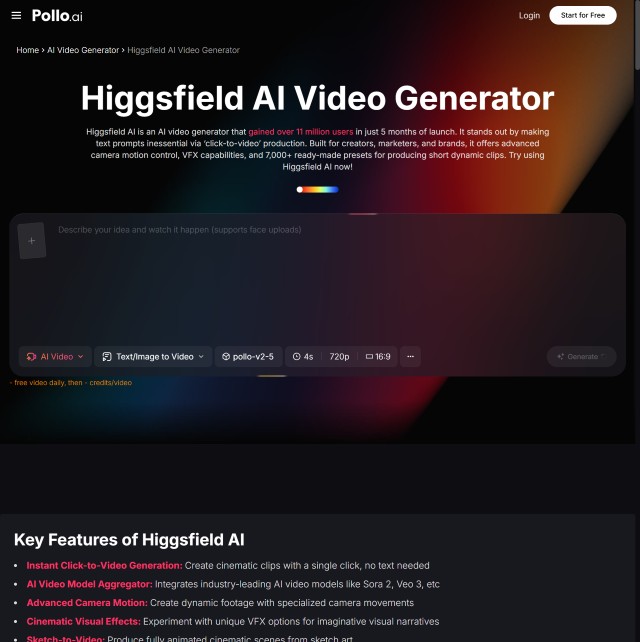
Some more technically advanced platforms, like Higgsfield AI, are genuinely powerful—but they tend to assume a higher baseline of technical knowledge. That’s not necessarily a flaw; it just means they may be better suited to users who are comfortable digging into more nuanced controls. For everyone else, the usability gap can be a real barrier.
Compatibility Testing: Does It Fit Into Your Existing Setup?
Even a great tool becomes a headache if it doesn’t integrate smoothly with the rest of your workflow. Compatibility testing checks whether a platform plays nicely with your devices, browsers, and downstream tools.
Things worth checking:
- Browser compatibility — Does it work equally well across Chrome, Firefox, Safari, and Edge?
- Mobile vs. desktop performance — Is the experience consistent, or does one suffer?
- Export formats and integrations — Can you easily move finished videos into the tools you already use?
Pollo.ai is built with cross-device consistency in mind. You can create and manage projects from different environments without running into unexpected behavior or format limitations. That kind of flexibility matters when your setup isn’t always the same from one session to the next.
The Long-Form Content Problem
Here’s something that often gets overlooked in platform evaluations: long-form video is a genuinely different beast.
Short clips are forgiving. Long-form content is where cracks start to show. Common issues include:
- Visual inconsistency across scenes — Characters, lighting, or style suddenly shifts mid-video
- Frame drops and rendering glitches — More common as file size and complexity increase
- Narrative drift — The video loses coherence over longer sequences
Pollo.ai handles longer projects with more stability than many alternatives. Rendering errors are less frequent, and scene-to-scene consistency holds up better over extended content. If you’re producing content for professional or business use—where quality needs to stay high throughout—this is a meaningful advantage.
Pollo.ai vs. the Field: A Testing-Based Comparison
When you compare AI video platforms through a testing lens rather than a feature checklist, a clearer picture emerges:
| Testing Dimension | Pollo.ai | More Advanced Platforms |
| Functional consistency | Strong | Variable with complex inputs |
| Performance at scale | Reliable | Can degrade on long-form content |
| Usability | Accessible to all skill levels | May require technical familiarity |
| Compatibility | Broad cross-device support | Varies by platform |
Pollo.ai’s approach prioritizes reliability, usability, and consistent output—making it a well-rounded choice for a wide range of creators. More technically advanced platforms have their place, especially for users who want granular control and are willing to invest time in learning the tool. But for most people, and particularly those building a consistent production workflow, the balance Pollo.ai strikes is hard to argue with.
Making the Decision with Confidence
Choosing an AI video tool is a commitment. You’re investing time in learning the platform, building workflows around it, and trusting it to deliver when it counts. That’s exactly why approaching the decision like a software tester—methodically, with real-world scenarios in mind—is so worthwhile.
Functional reliability, performance under load, ease of use, and cross-platform compatibility aren’t abstract criteria. They’re the things that determine whether a tool helps you create more effectively or becomes another source of friction in your day.
Evaluated on all of those dimensions, Pollo.ai holds up well for the majority of creators—from individual content producers to teams working at scale. Advanced tools have their audience, and if you have the technical chops to get the most out of them, they’re worth exploring. But if you want something that works predictably, scales reasonably, and doesn’t require a steep learning curve to get real results, Pollo.ai is a strong, defensible choice.
Test before you commit. Know what you’re evaluating. And choose the tool that fits the work you actually do—not just the one with the longest feature list.